Creating a Stunning Website with Wix
In the digital age, having a robust online presence is essential for individuals and businesses alike. Wix has emerged as…
In the digital age, having a robust online presence is essential for individuals and businesses alike. Wix has emerged as a leading website builder, offering a user-friendly platform that empowers you to create stunning websites without needing extensive technical skills. With its intuitive interface and a plethora of features, Wix caters to a diverse range of users, from budding entrepreneurs to seasoned professionals.
Whether you are looking to establish a personal blog, showcase your portfolio, or launch an online store, Wix provides the tools necessary to bring your vision to life. What sets Wix apart from other website builders is its versatility and flexibility. You can choose from hundreds of professionally designed templates tailored to various industries and purposes.
This means that regardless of your niche, you can find a starting point that resonates with your brand identity. Furthermore, Wix continuously updates its platform, ensuring that you have access to the latest design trends and technological advancements. As you embark on your website-building journey, understanding the capabilities of Wix will empower you to create a site that not only meets your needs but also captivates your audience.
Summary
- Wix offers a user-friendly platform ideal for building professional websites without coding.
- Selecting the right template is crucial to match your website’s purpose and style.
- The drag-and-drop editor allows easy customisation of layouts and content.
- Wix supports SEO optimisation and e-commerce integration to enhance visibility and sales.
- Mobile optimisation ensures your site performs well across all devices before launch and promotion.
Choosing the Right Template for Your Website
Selecting the right template is a crucial first step in your website creation process. With Wix’s extensive library of templates, you have the freedom to explore various designs that align with your vision. When browsing through the options, consider the purpose of your website and the message you wish to convey.
A well-chosen template can serve as a solid foundation for your site, providing a cohesive look and feel that enhances user experience. As you sift through the myriad of templates, pay attention to the layout, colour scheme, and overall aesthetic. Each template is designed with specific functionalities in mind, so think about how you want your content to be presented.
For instance, if you are creating an online portfolio, opt for a template that highlights images and allows for easy navigation between projects. Conversely, if you are launching an e-commerce site, look for templates that feature product galleries and shopping cart functionalities. By carefully selecting a template that aligns with your goals, you set the stage for a successful website.
Customising Your Website with Wix’s Drag-and-Drop Editor
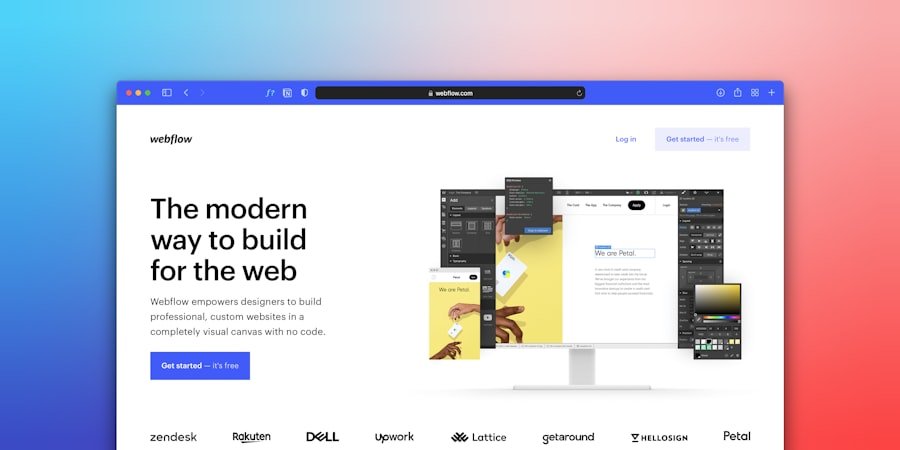
Once you’ve chosen a template that resonates with your vision, it’s time to dive into customisation using Wix’s drag-and-drop editor. This feature is one of the platform’s standout attributes, allowing you to modify your site effortlessly without any coding knowledge. You can rearrange elements, add new sections, and adjust layouts simply by dragging and dropping components into place.
This level of flexibility means that you can create a unique website that reflects your personal style or brand identity. As you navigate the editor, take advantage of the various tools at your disposal. You can change fonts, alter colours, and incorporate interactive elements such as buttons and forms.
The ability to see changes in real-time as you edit makes the process both engaging and satisfying. Additionally, Wix offers a range of apps and integrations that can enhance your site’s functionality. Whether you want to add social media feeds or implement booking systems, these features can be seamlessly integrated into your design, further personalising your website.
Adding Stunning Visuals and Content to Your Website
| Metric | Description | Recommended Value | Impact on Website |
|---|---|---|---|
| Image Resolution | Quality of images used on the website | 72-150 dpi for web | Ensures clear visuals without slowing down load times |
| Content Length | Number of words per page | 500-1000 words | Improves SEO and user engagement |
| Visual Content Ratio | Percentage of images/videos to text | 30-50% | Balances aesthetics and information delivery |
| Page Load Time | Time taken for a page to fully load | Under 3 seconds | Enhances user experience and reduces bounce rate |
| Font Size | Size of the main body text | 16-18 px | Improves readability and accessibility |
| Colour Contrast Ratio | Contrast between text and background | At least 4.5:1 | Ensures text is readable for all users |
| Alt Text Usage | Percentage of images with descriptive alt text | 100% | Improves accessibility and SEO |
Visuals play a pivotal role in capturing the attention of your visitors and conveying your message effectively. As you build your website on Wix, consider incorporating high-quality images, videos, and graphics that resonate with your audience. Wix provides access to a vast library of free images and videos through its integration with Unsplash and other platforms, making it easy for you to find the perfect visuals for your site.
Remember that the right imagery can evoke emotions and create a lasting impression on your visitors. In addition to visuals, compelling content is essential for engaging your audience. Crafting well-written text that is informative and relevant will keep visitors on your site longer and encourage them to explore further.
Use clear headings and concise paragraphs to enhance readability, ensuring that your message is easily digestible. Incorporating calls-to-action (CTAs) throughout your content can guide users towards desired actions, whether it’s signing up for a newsletter or making a purchase. By striking the right balance between stunning visuals and engaging content, you create an inviting atmosphere that encourages interaction.
Optimising Your Website for Search Engines
Creating a visually appealing website is only part of the equation; optimising it for search engines is equally important if you want to attract organic traffic. Wix offers built-in SEO tools that simplify the process of enhancing your site’s visibility on search engines like Google. Start by ensuring that each page has unique titles and meta descriptions that accurately reflect the content within.
This not only helps search engines understand what your pages are about but also entices users to click through when they see your site in search results. Another critical aspect of SEO is keyword optimisation. Research relevant keywords related to your niche and incorporate them naturally into your content.
This includes headings, body text, and image alt tags. Additionally, ensure that your website loads quickly and is mobile-friendly; both factors significantly impact search engine rankings. By taking advantage of Wix’s SEO features and implementing best practices, you can improve your site’s chances of ranking higher in search results, ultimately driving more traffic to your website.
Integrating E-commerce and Payment Options with Wix

If you’re looking to sell products or services online, Wix provides robust e-commerce capabilities that make setting up an online store straightforward. With its e-commerce templates and features, you can create a professional-looking shop that showcases your offerings effectively. Start by adding product pages where you can include detailed descriptions, pricing information, and high-quality images.
The ability to categorise products makes it easy for customers to navigate through your offerings. Wix also supports various payment options, allowing you to cater to a broader audience. You can integrate payment gateways such as PayPal, Stripe, or Wix Payments seamlessly into your site.
This flexibility ensures that customers have multiple options when it comes to completing their purchases, enhancing their overall shopping experience. Additionally, consider implementing features like abandoned cart recovery emails or discount codes to encourage conversions and boost sales. By leveraging Wix’s e-commerce tools effectively, you can create a thriving online business.
Mobile Optimisation: Ensuring Your Website Looks Great on All Devices
In today’s mobile-centric world, ensuring that your website looks great on all devices is paramount. With Wix’s mobile optimisation features, you can easily create a responsive design that adapts seamlessly to different screen sizes. As you customise your site in the editor, take advantage of the mobile view option to see how your design translates on smartphones and tablets.
This allows you to make necessary adjustments to ensure an optimal user experience across all devices. Pay attention to elements such as font size, button placement, and image scaling when optimising for mobile. A cluttered layout can deter users from engaging with your content on smaller screens; therefore, simplicity is key.
Ensure that navigation is intuitive and that important information is easily accessible without excessive scrolling or zooming. By prioritising mobile optimisation in your design process, you enhance user satisfaction and increase the likelihood of retaining visitors who access your site on their mobile devices.
Launching Your Website and Promoting it to the World
After investing time and effort into building and customising your website on Wix, it’s time for the exciting moment of launching it to the world! Before hitting that publish button, take a moment to review every aspect of your site thoroughly. Check for broken links, typos, or any design inconsistencies that may detract from the user experience.
Once you’re confident in your creation, go ahead and publish it—this marks the beginning of your online journey. However, launching your website is just the first step; promoting it effectively is crucial for attracting visitors. Utilise social media platforms to share your new site with friends, family, and potential customers.
Consider creating engaging posts or even running targeted ads to reach a wider audience. Additionally, leverage email marketing by sending out newsletters or announcements about your launch to keep subscribers informed about updates or promotions on your site. By employing various promotional strategies, you can drive traffic to your newly launched website and begin building an engaged audience.
In conclusion, creating a website with Wix is an empowering experience that allows you to express yourself or promote your business effectively. From choosing the right template to optimising for search engines and launching successfully, each step plays a vital role in establishing an impactful online presence. Embrace the journey ahead as you navigate through these processes—your efforts will undoubtedly pay off as you connect with audiences around the globe.
FAQs
What is Wix Website Builder?
Wix Website Builder is an online platform that allows users to create and design websites without needing to write code. It offers a drag-and-drop interface, templates, and various customisation options to build websites for personal, business, or e-commerce purposes.
Is Wix free to use?
Wix offers a free plan that includes basic features and Wix-branded domain names. However, to access premium features such as custom domains, additional storage, and removal of Wix ads, users need to subscribe to one of the paid plans.
Do I need technical skills to use Wix?
No, Wix is designed for users with little to no technical knowledge. Its intuitive drag-and-drop editor and pre-designed templates make it easy to create a professional-looking website without coding skills.
Can I connect my own domain to a Wix website?
Yes, Wix allows users to connect their own custom domain names to their websites, but this feature is available only on premium plans.
Does Wix support e-commerce functionality?
Yes, Wix provides e-commerce features that enable users to create online stores, manage products, accept payments, and handle shipping. These features are available through specific e-commerce plans.
Is Wix suitable for SEO?
Wix includes built-in SEO tools to help improve website visibility on search engines. Users can customise meta tags, URLs, and use SEO wizards to optimise their sites.
Can I switch templates after publishing my Wix website?
No, once a Wix website is published, you cannot change the template. However, you can create a new site with a different template and transfer your content manually.
What kind of customer support does Wix offer?
Wix provides customer support through various channels, including a help centre with articles and tutorials, email support, and phone support for premium plan users.
Is Wix mobile-friendly?
Yes, Wix websites are automatically optimised for mobile devices. Users can also customise the mobile view separately within the editor.
Can I integrate third-party apps with Wix?
Yes, Wix has an App Market where users can find and install various third-party applications to extend the functionality of their websites, such as marketing tools, booking systems, and social media integrations.